Local Export
The local export process is slightly different than the general export process. By local export is meant that customers sent their cargo/shipments to the CHI warehouse without having an HAWB number yet. In that case the shipment has to be created using an “alternativeReference”. That is a customer-owned id, e.g. the shipment id of the customers Transport Management System (TMS).
If a shipment was announced just with an “alternativeReference”, then the HAWB number has to be set/post-notified later on. There are two ways for post-notification.
Post-Notification of HAWB Number by Update of Shipment
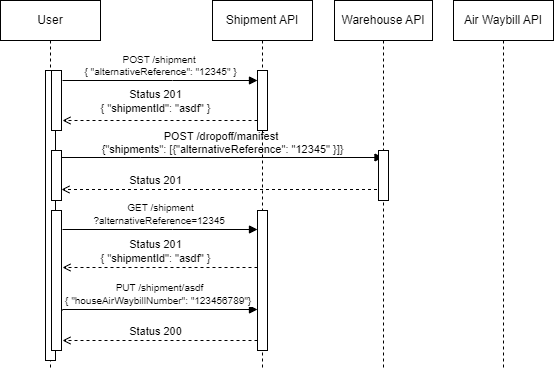
- Create the shipment via POST /shipment using the “alternativeReference”
- Announce the dropoff of the shipment at CHI warehouse. Reference the shipment by “alternativeReference”.
- If the user finally has a HAWB number for the shipment, then update the shipment object. If the user did not store the shipmentId, then id must be queried first (see also How to reference Shipments).
Post-Notification of HAWB Number by Creation of House Air Waybill
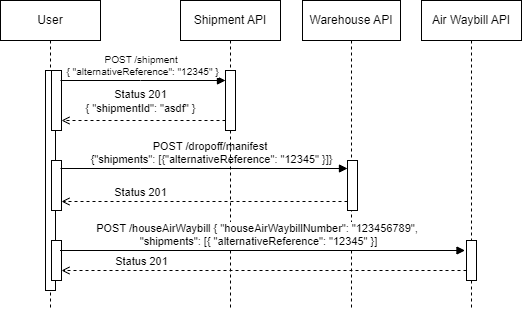
- Create the shipment via POST /shipment using the “alternativeReference”
- Announce the dropoff of the shipment at CHI warehouse. Reference the shipment by “alternativeReference”.
- Create a House Air Waybill and reference the shipment by “alternativeReference”. The attribute “houseAirWaybillNumber” of the shipment object will be set automatically.
The creation of a House Air Waybill object also allows for the consolidation of shipments under one “houseAirWaybillNumber” (see also Consolidation of Shipments).